Library
The CubeSat_PC104 library: one symbol file, CubeSat_PC104.kicad_sym, and
one footprint folder, CubeSat_PC104.pretty. In the repository they are in
library/; on the
releases page
they are CubeSat_PC104-<version>.zip.
Getting started
shows how to add them to a project.
The library is named for the form factor; its parts are named for the CubeSat
Kit specification they follow, hence CSK_.
| Part | Kind | What it is |
|---|---|---|
CSK_PC104_Slot0 |
Footprint | A whole Slot 0 board: outline, bus headers, mounting holes, keepouts |
CSK_PC104_Slot1 |
Footprint | A whole Slot 1 board: outline, bus headers, mounting holes |
CSK_PC104_Bus |
Footprint | The bus header pads alone |
CSK_Bus |
Symbol | The 104 bus pins, named by signal |
SUCHAI_Payload |
Symbol | The bus as the SUCHAI 2 and 3 payloads use it |
Both symbols use the same pin numbers as the footprints: H1 is pins 1 to 52, H2 is pins 53 to 104, odd pins on one row and even on the other as on the header. Either symbol fits any of the three footprints.
Footprints
CSK_PC104_Slot0
A CubeSat Kit user module in the base "Slot 0" pattern: the board outline on
Edge.Cuts, the H1 and H2 2×26 headers on the 2.54 mm grid, four mounting
holes, and rule areas that keep footprints off the right-edge patch and the
separation-switch clearances. The origin is H1 pin 1.
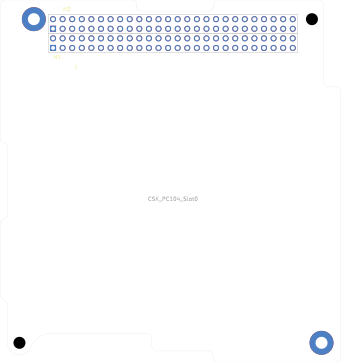
The keepouts are rule areas, so they appear in the board editor but not in this plot. Stack and mechanical lists where the footprint departs from the specification's drawing.
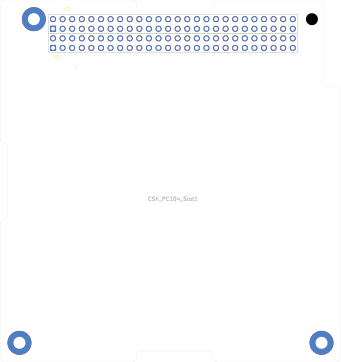
CSK_PC104_Slot1
The same headers and holes in the extended "Slot 1" pattern: a full bottom-left corner and no keepouts.
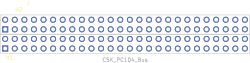
CSK_PC104_Bus
The H1 and H2 pads alone, placed exactly as on CSK_PC104_Slot0, with no
outline or holes. Use it for a second bus connector on a board, as the
bus breakout does, or to put the bus on a board whose outline
you draw yourself.
Symbols
CSK_Bus
The bus for any module. Unit A is H1, unit B is H2. Every pin is passive and
named by its CubeSat Kit bus signal; Bus pinout lists them and
where the names come from. Its footprint field defaults to CSK_PC104_Slot0.
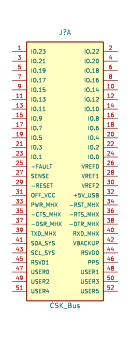
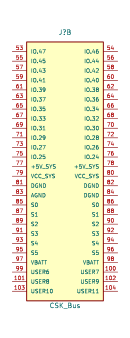
Passive pins never trip ERC's driver checks, whatever a module connects. The
bus's direction depends on the module: IO.0 is an output on one board and an
input on the next.
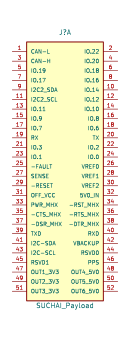
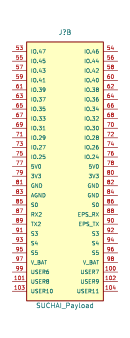
SUCHAI_Payload
The same two units with the SUCHAI 2 and 3 payload's own names and electrical
types: power pins are power inputs, UART and I²C pins have directions. Pins
the payload does not use keep their CSK_Bus names and stay passive.
SUCHAI payload lists its pins.
How the library is made
None of the parts is drawn by hand. tools/genfp.py generates the two board
footprints from the specification's DXF drawings, tools/genbus.py cuts
CSK_PC104_Bus from CSK_PC104_Slot0, and tools/gensym.py writes both
symbols from the pin tables tools/csk_bus_pins.csv and
tools/suchai_pins.csv. CI checks that the committed library is what the
generators produce. Development has the details.