Getting started
Install
Clone the repository into your OpenSCAD library folder. In OpenSCAD, File → Show Library Folder opens it.
git clone https://github.com/CameronBrooks11/tessella.git
You can also clone it next to your project and import it by relative path. Tessella has no dependencies.
To pin a release, check out its tag:
git clone --branch v0.1.0 https://github.com/CameronBrooks11/tessella.git
Tessella is developed against OpenSCAD 2026.10.15. It uses function literals, which need OpenSCAD 2021.01 or later.
Import the library
use <tessella/tess.scad>
tess.scad is an index file that pulls in every tiling and the utilities. use is enough for all the functions and
modules. include also works, and additionally brings the library’s one top-level variable, EPSILON, into your
file.
A first tessellation
This draws three rings of hexagons around a central one.
use <tessella/tess.scad>

radius = 10; // centre-to-corner distance of each hexagon
gap = 1;     // how much to shrink each tile

// 1. where the tiles go
centers = hexagons_centers_radial(radius = radius, levels = 3);

// 2. the outline of each tile
vertices = hexagons_vertices(radius = radius - gap, centers = centers);

// 3. draw them
generic_poly(
    vertices = vertices,
    paths = [[0, 1, 2, 3, 4, 5, 0]],
    centers = centers,
    color_scheme = "scheme1",
    extrude = 2
);
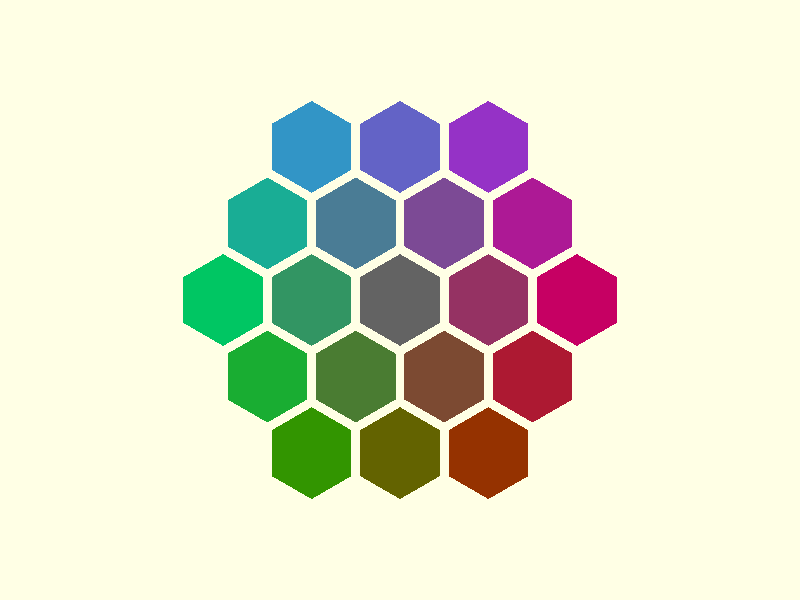
Three things to notice:
centersis laid out with the fullradius, andverticesis drawn with a smaller one. The difference is what leaves a gap between tiles. With the same radius for both, the tiles touch.pathsis the order in which each tile’s corners are joined. It is the same for every tile, so it is given once.centersis passed togeneric_poly()only so it can colour each tile by its position. Leave outcentersandcolor_schemeand the tiles are drawn in the default colour.
Remove some tiles
filter_center_points() takes a list of centres and a list of points to remove from it. Apply it before computing
the vertices:
use <tessella/tess.scad>

radius = 10;

all_centers = hexagons_centers_radial(radius = radius, levels = 3);
removed = [[0, 0], [17.3205, 0], [-17.3205, 0]];
centers = filter_center_points(all_centers, removed);

vertices = hexagons_vertices(radius = radius - 1, centers = centers);
generic_poly(vertices = vertices, paths = [[0, 1, 2, 3, 4, 5, 0]], extrude = 2);
The coordinates do not have to be exact. echo(all_centers); prints them rounded to six significant figures, and a
point copied from that output still matches. Removing tiles explains why.